
To say that technology is ephemeral for some of us is probably an understatement. For a long time, I have felt relatively clueless about the more modern innovations. Still, those are the things that we hear the most news about – the latest phone models or laptops.
However, there is still plenty to be said about improvements on old classics as well – at least in my humble opinion. Since the very invention of computers, servers have been a key part of storing data. However, they have come a long way since their first appearance. In fact, they have evolved into a fairly integral part of most organizations.
As this blog post outlines, storage in general has become quite an irritation for a lot of businesses. Considering the sheer amount of digital data that we need to hold onto, this is hardly a surprise. However, it has led a lot of folks to look for external solutions.
The Basics: What is a Data Center Server?
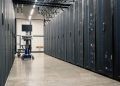
A common misconception about servers is that they are some sort of mysterious external device. However, they are in fact another computer. Their purpose is simply for data storage rather than traditional usage. At their core, though, they are still computing things.
Most tech gurus refer to them as “super computers” if they do not just use the phrase “server.” Either way, that can give a glimpse into what they are and the role that they play not just for companies, but also for us as individuals.

Admittedly, most of us probably do not need to get a server for our own personal use. Some exceptions could be Bitcoin farmers or independent artists, but even then, they remain exceptions and not the rule. That does not mean we should not keep ourselves informed about them, though.
They are designed to accomplish a few things. Most notably, they exist to manage, store, and keep track of data from devices, networks, and even systems. That means a data center server can have a huge workload and still get everything accomplished.
While they differ from a traditional desktop, they can still perform the same functions, along with the extra ones that I mentioned. This is part of why they have become an integral part of many operations. There are even jobs dedicated entirely to managing databases like this, usually remotely from home or in an office.
How do they Work?
Something to bear in mind as I shift gears is that the term “server” can also apply to virtual machines, so that does have an impact on how they work in some circumstances. It will, of course, depend on what you choose to establish and how you want it to operate. If you are unsure, you can always get a consultation with a tech professional.
Starting with the physical servers, they simply run the software that is required to make it one. It really is that easy, even if on the surface this can all seem quite complex and inaccessible to those who are not amazing with technology. Thankfully, this is not the case.
When it comes to virtual ones compared to the physical ones, both have their own independent operating systems and applications. So, they should not be able to interfere with each other’s systems. If that does happen, something has probably gone considerably wrong.
The virtual types are sometimes called “clouds,” as you can read about here, https://www.tomsguide.com/buying-guide/best-cloud-storage, but that is not always the case. To some extent they are different things, considering that cloud storage is accessible to multiple people at once when shared.
The critical thing to retain about this is that they require two things to function as intended: the aforementioned software and an operating system. All computers should come with the latter, so likely that is not a huge concern. The software is what allows it to become a server in specific, so it is required.
Essentially, it allows for access to some of the underlying components and hardware within the operating system. Then, that system allows users to interact with the files that are stored as well as place new ones. As you can see, both are necessary for proper deployment.
While the technical details can get a bit complex (I did my best to make it simple, but that is admittedly quite a challenge), I do hope that this has given you some valuable insights into how these data centers work. It might not seem like something all that important to learn about, I think the final two points that I mentioned are probably the biggest takeaway.
Whether you intend to utilize some for your own business or are looking to recommend them to your boss (or something else), there is a lot to figure out about them.